Smart Home Malaysia: A Starter Guide
New to smart home tech in Malaysia? A simple guide to smart lighting, aircond control, door locks, cameras, Wi-Fi and wiring during renovation.
You are halfway home from work in the Klang Valley jam when you wonder if you switched off the aircond this morning. Or you are lying in bed, finally comfortable, and realise the kitchen light is still on downstairs. Small things, but they add up.
A smart home fixes many of these little annoyances. You can control lights, aircond, locks and cameras from your phone, set things to run on a schedule, or let them react when you walk in the door.
The trick is to start in the right order. This guide walks through the main parts of a smart home, what to think about for Malaysian homes, and why the best time to plan it all is before your renovation starts.
Start With the Problem, Not the Gadget
It is easy to buy a smart plug here and a smart bulb there, then end up with five different apps that do not talk to each other. A better way is to list what bugs you at home and pick tools to solve those problems.
Some common reasons Malaysian homeowners go smart:
- Turning the aircond on before reaching home on a hot afternoon
- Checking the front gate or door while at work or on holiday
- Letting family members or a cleaner in without handing out keys
- Waking up to lights that come on slowly instead of a harsh switch
- Cutting down on wasted electricity from things left on
Once you know your top two or three reasons, everything else becomes easier to plan.
Strong Wi-Fi Comes First
Almost every smart device depends on your home network. If the Wi-Fi is weak, your smart lock will lag, your camera will drop out and your lights will ignore you. Fix this before you buy anything else.
Malaysian homes can be tricky for Wi-Fi. Thick concrete and brick walls, long terrace houses and multi storey semi-D homes all block the signal. A single router near the front door rarely reaches the back kitchen or the top floor.
Ways to improve coverage:
- Place the router in the middle of the home, not hidden in a cabinet or at the far end of the house.
- Use a mesh system with two or three units spread across the floors. They work together as one network.
- Run network cables to key spots such as the TV area, the home office and each floor. Wired connections are faster and more stable, and they can link your mesh units too.
- Give smart devices their own network name if your router allows it. This keeps things tidy and easier to manage.
Smart Lighting
Lighting is the most popular place to start, and for good reason. It is simple, and you notice the difference every day.
You have two main choices:
Smart bulbs replace your normal bulbs. They are easy to fit and good for renters or for trying things out. The catch is that the wall switch must stay on, or the bulb loses power and stops responding.
Smart switches replace the switch on the wall. Your normal lights become smart, and guests can still use the switch as usual. These are better for a full home setup, but they need proper wiring and should be installed by a qualified electrician. Some smart switches need a neutral wire at the switch box, which older homes may not have. Check this early.
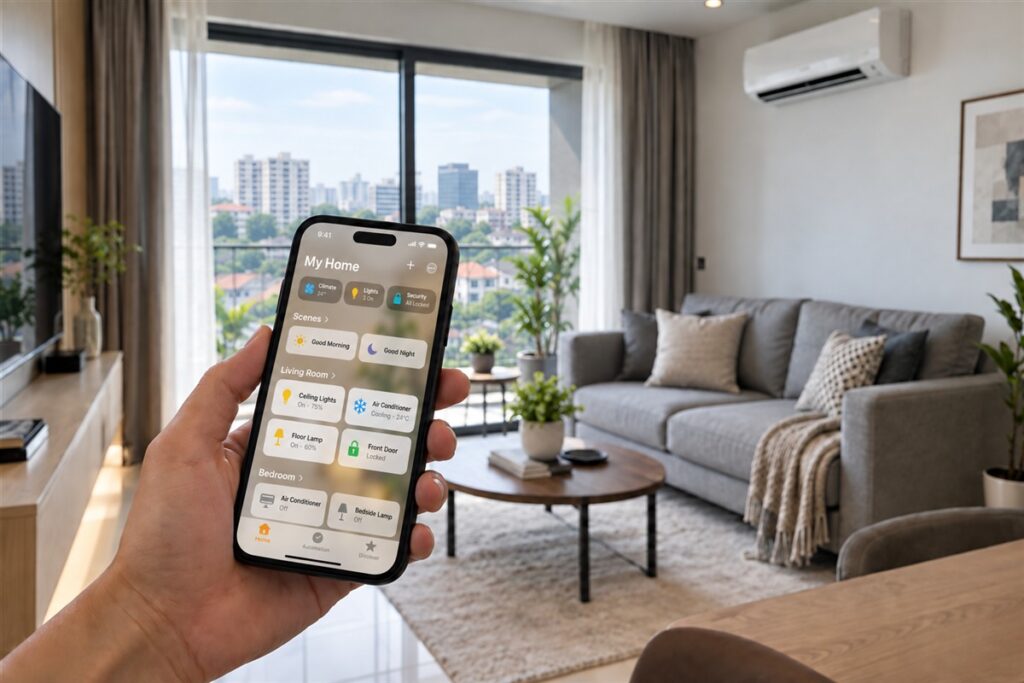
Once installed, you can set scenes such as “Movie” to dim the living room, or “Goodnight” to switch off everything downstairs with one tap.
Aircond Control
In our climate, this is where many people feel the biggest benefit. You can switch on the bedroom aircond before you get home, set it to turn off after you fall asleep, or check that nobody left it running all day.
There are two usual ways to do it:
- A smart infrared remote. This small box sits in the room and copies the signal of your normal remote. It works with most existing aircond units and is an easy upgrade.
- Built-in Wi-Fi on the aircond itself. Many newer units come with this, controlled through the maker’s app.
For the infrared option, place the box where it has a clear line of sight to the aircond. Some models also read the room temperature and humidity, which helps you set smarter schedules.
Smart Door Locks and Gates
A digital lock lets you open the door with a PIN, fingerprint, card or phone. No more lost keys, and you can give a temporary code to a relative or cleaner, then cancel it later.
Things to think about:
- Door type and thickness. Not every lock fits every door. Measure your door and check with the installer before buying.
- Backup power. Most locks run on batteries. Choose one that warns you when power is low and has an emergency way in, such as a backup key or external power point.
- Weather. For doors or gates that face the rain and afternoon sun, choose a lock that is made for outdoor use.
- Condo rules. In a condo, your main door may be part of the building’s fire safety design. Check with your condo management before changing the lock or door.
For landed homes, the auto gate can often be linked too, so you can open it from your phone as you drive up.
Security Cameras
Cameras bring peace of mind, especially for terrace houses and semi-D homes where the porch and back lane matter.
Plan the view first. Common spots are the front gate, the car porch, the back door and the side passage. Indoors, a camera can watch the living room while you are away.
A few tips:
- Choose outdoor cameras that can handle heavy rain, heat and humidity.
- Night vision is useful, because many incidents happen after dark.
- Decide where recordings go. Some cameras save to a memory card, some to a recorder box, and some to the cloud.
- Wired cameras are more reliable than battery ones, but need cables planned in advance.
- Respect your neighbours’ privacy. Point cameras at your own property, not into the house next door.
Plan the Wiring During Renovation
This is the single most useful tip in this guide. Adding smart features after a renovation often means ugly surface trunking, extra hacking or giving up on the idea. Planning during renovation costs much less effort.
Talk to your designer or electrician about:
- Network cable points in each main room and near the TV
- Power points for cameras at the gate, porch and ceiling corners
- Neutral wires at every light switch box
- A small cabinet for the router and network gear, with ventilation and a power point inside
- Power near the main door for a digital lock or doorbell camera
- Spare conduits so you can add cables later without breaking walls
If you are doing a plaster ceiling, this is also the best moment to run cables above it. A ceiling specialist like JT Ceiling can plan access panels so future work is easier.
What Affects the Cost
There is no set price for a smart home, because every setup is different. The cost depends on:
- How many rooms and devices you want to control
- Smart bulbs versus smart switches
- New wiring, conduits and network cables
- The number and type of cameras and locks
- If you install it yourself or hire a professional
Get at least three written quotes that list the same devices and the same work, so you can compare fairly.
Smart Home Questions
Can I make my rented condo smart?
Yes. Stick to smart bulbs, smart plugs and an infrared aircond remote. These need no wiring changes and come with you when you move.
Will a smart home still work if the internet goes down?
Some features will stop, especially remote control from outside. Many devices still work with local switches or keypads, so check this before you buy.
Is a smart door lock safe?
A good digital lock is as safe as a normal lock, often safer because you control who has access. Change default codes and keep the app updated.
Do all my devices need to be the same brand?
No, but fewer apps make life easier. Before buying, check that new devices can work with the system you already use.
Start Small, Plan Big
You do not need to automate the whole house on day one. Get your Wi-Fi strong, pick the one or two problems that annoy you most, and solve those first. If a renovation is coming, plan the wiring now, even for devices you will add later. A smart home in Malaysia works best when it quietly makes daily life a little easier.